Usage
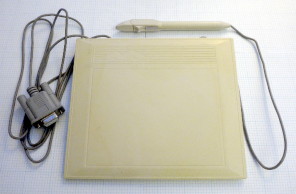
The tabby program runs from the commandline and takes as a single argument
the path to the serial port that the tablet is attached to. To install, type
"make install" (without the quotes) or simply copy the tabby binary to some-
where in your path (e.g.
/usr/local/bin). To start the driver, type:
tabby PORT
where
PORT is the path to the serial port (e.g.
"
/dev/ttyS0" or "
/dev/ttyUSB0").
Building from source
To build the tabby binary, simply run "make". You will need gcc and X11
headers (including those for the Xtest extension). You can edit the Makefile
if you need to change the compiler or header locations. You may also need to
specify your X11 header location by adding, for example, "-I/usr/X11R6/include"
to the compiler commandline.
Tuning the driver
Although the driver works well for the tablet that I own, it may need some
adjustments for optimal performance with other tablets. In the source, there
are five main parameters that can be changed, three of which affect the
proximity sensor and two of which affect the position sensor. If you change
these values you will need to recompile the program before they take effect.
Since there is not a lot of precision in the proximity data a running average
is used to improve the resolution of the proximity sensor. Unfortunately, the
data is only accurate down to about a centimeter so some tricks (such as a
weighted average) are used to reduce positional jumps when the stylus is raised
and lowered. The tunable parameters are:
PROX_BUF_SIZE |
The size of the ring buffer. Must be a multiple of 2
because each set of data contains 2 proximity readings.
A large sized ring buffer provides greater the accuracy at
a cost of reduced responsiveness. Too low a value can lead
to false stylus up and stylus down events.
The default value is 32
|
PROX_DOWN |
The proximity level (between 0 and 7) at which the stylus is
considered to be down. Values between 4 and 4.5 are sensible
The default value is 4.3
|
PROX_UP |
The proximity level (between 0 and 7) at which the stylus is
considered to be up. Values between 3 and 4 are sensible
The default value is 4.0
|
The X/Y position also tends to be noisy. The is a lot of low-level jitter
(1 or 2 pixels) even when the stylus is not being moved. Occassionaly, a
large jump (50 or more pixels) is erroneously reported. There are two
paramters that can help alleviate this:
MIN_DISTANCE |
Motions of less than this distance will be ignored.
The distance is the length of the motion vector measured in
pixels. For example, a move of 3 pixels to the right and 4
up would have a distance of 5 (32 + 42 = 52). The default
value of 2.5 can handle a jitter of about 2 pixels in either
direction.
The default value is 2.5
|
MAX_DISTANCE |
Motions of greater than this distance will be ignored.
Again, the distance is the length of the motion vector
measured in pixels. This parameter should be set higher than
the largest motion seen in normal usage. If it is set too
low then the pointer will stop tracking the stylus when it is
moved quickly.
The default value is 50
|